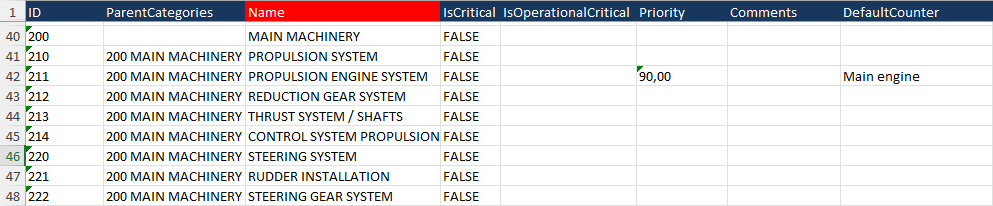
AssetsCategories
General
The categories will be used to link all maintenance tasks and spare parts to a category. The sheet in the Excel file is called “AssetsCategories”
Details fields
To fill the Excel file incorrectly, amake proper way, take caresure that all fields are properlyfilled filled.correctly. Below are the fields listed.
FieldID
MAX Characters
Required
Comment
ID
128
Id number of the category
ParentCategories
If this category is a child of another category, enter the ID number of the parent category, followed by a space, followed by the name of the parent category
Name
128
X
Name of the category
IsCritical
5
True or False
IsOperationalCritical
5
True
or False
Priority
18,18.2
Number with 2 decimals, separated by a comma
Comments
1024
Comment for the category
Defaultcounter
128
Preferred counter for counter-based maintenance tasks. The name of the counter should be mentioned
Example