# SafetyCategoriesList

#### <span style="color: rgb(0, 65, 130);">General</span>

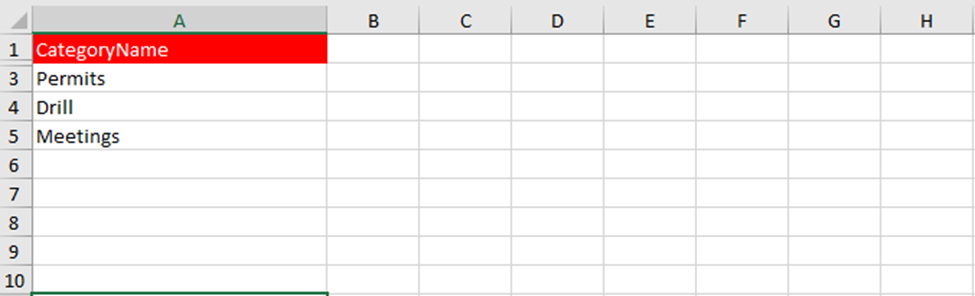
<span style="color: rgb(0, 0, 0);">This part is used to load a list of all categories of the Safety module. The sheet in the Excel file is called “SafetyCategoryList”.</span>

#### <span style="color: rgb(0, 65, 130);">Details fields</span>

<span style="color: rgb(0, 0, 0);">To fill the Excel file correctly, ensure that all fields are completed accurately. Below are the fields listed.</span>

<table border="1" id="bkmrk-field-max-characters" style="font-family: -apple-system, BlinkMacSystemFont, 'Segoe UI', Oxygen, Ubuntu, Roboto, Cantarell, 'Fira Sans', 'Droid Sans', 'Helvetica Neue', sans-serif; font-size: 14px; width: 100%; height: 216.969px;"><colgroup><col style="width: 25.5066%;"></col><col style="width: 10.7271%;"></col><col style="width: 10.0119%;"></col><col style="width: 53.7545%;"></col></colgroup><thead><tr style="background-color: rgb(230, 126, 35); height: 46.5938px;"><td style="height: 46.5938px;">Field</td><td style="height: 46.5938px;">MAX Characters</td><td style="height: 46.5938px;"> Required</td><td style="height: 46.5938px;">Comment</td></tr></thead><tbody><tr style="height: 80.1875px;"><td style="height: 80.1875px;">CategoryName</td><td style="height: 80.1875px;">128</td><td style="height: 80.1875px;">X</td><td style="height: 80.1875px;">Name of each safety category you want to input into MXSuite.</td></tr></tbody></table>

#### <span style="color: rgb(0, 65, 130);">Example</span>

[![image.png](https://docs.mxsuite.nl/uploads/images/gallery/2026-11/scaled-1680-/FGlimage.png)](https://docs.mxsuite.nl/uploads/images/gallery/2026-11/FGlimage.png)