# General info

#### <span style="color: rgb(0, 65, 130);">Import field relations with general data</span>

<span lang="EN-GB" style="mso-ansi-language: EN-GB;">If you filled in the following columns in the Excel file: </span>

- <span lang="EN-GB" style="mso-ansi-language: EN-GB;">Budgetcodes </span>
- <span lang="EN-GB" style="mso-ansi-language: EN-GB;">Currencies</span>
- <span lang="EN-GB" style="mso-ansi-language: EN-GB;">Product categories</span>
- <span lang="EN-GB" style="mso-ansi-language: EN-GB;">Units</span>
- <span lang="EN-GB" style="mso-ansi-language: EN-GB;">Ranks</span>

<span lang="EN-GB" style="mso-ansi-language: EN-GB;">Then this data must exist in the Administration module</span>

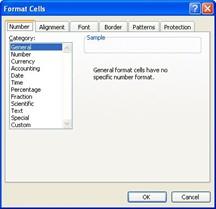
<span lang="EN-GB" style="mso-ansi-language: EN-GB;">All fields in the Excel file must be in text format.  
For example, if there is a problem after importing inventory with the PartNumber (column C) change the format of this column (Right mouse click on this column, select Format Cells) to category General   
</span>

<span lang="EN-GB" style="mso-ansi-language: EN-GB;">[![Excel field format.jpg](https://docs.mxsuite.nl/uploads/images/gallery/2025-05/scaled-1680-/excel-field-format.jpg)](https://docs.mxsuite.nl/uploads/images/gallery/2025-05/excel-field-format.jpg)</span>

<p class="callout info"><span lang="EN-GB" style="mso-ansi-language: EN-GB;">Do not change the top row of the Excel file! If this is changed, the import will fail</span></p>