# API interface

The application programming interface (API) is used to make a connection between MXSuite and other software.

# Manage API keys

The HTTP(S) API has been available since MXSuite version 3.3.0.

To create an API key, there are 2 steps needed:

1. Create the API-user
2. Create the API-key

##### Create an API user

1. Open the **Administration** module
2. Click on **Users**  
    [![image.png](https://docs.mxsuite.nl/uploads/images/gallery/2025-01/scaled-1680-/image.png)](https://docs.mxsuite.nl/uploads/images/gallery/2025-01/image.png)
3. Create a new user for the API with the correct user rights. Assure that you select user type API.  
    [![image.png](https://docs.mxsuite.nl/uploads/images/gallery/2025-01/scaled-1680-/1BZimage.png)](https://docs.mxsuite.nl/uploads/images/gallery/2025-01/1BZimage.png)

##### Create the API key

1. Open the **Administration** module
2. Click on **API keys**  
    [![image.png](https://docs.mxsuite.nl/uploads/images/gallery/2025-01/scaled-1680-/5cHimage.png)](https://docs.mxsuite.nl/uploads/images/gallery/2025-01/5cHimage.png)
3. Click on **New...** [![image.png](https://docs.mxsuite.nl/uploads/images/gallery/2025-01/scaled-1680-/qzTimage.png)](https://docs.mxsuite.nl/uploads/images/gallery/2025-01/qzTimage.png)
4. Enter the **Name** of the API so you can easily distinguish all API keys.
5. Select the related API user
6. If needed, enter an expiry date.
7. Click on **Save &amp; close**
8. Now the API key is created and visible.

# General API usage

##### Authentication

To access the API, first an API key needs to be created from the Administration page. The key will be used as a header in the HTTP request.

MXSuite expects a `mx-apikey` header on each request.

```bash
mx-apikey: apikey
```

<p class="callout warning">Besides the mx-apikey header, two more headers are required.  
  
**accept**: application/json, text/plain, \*/\*  
**content-type**: application/json  
</p>

##### Error handling

Successful responses will return a 200 or 204 HTTP response code. Errors will return a 4xx or a 5xx.

Some scenarios of errors:

- missing the mx-apikey header
- wrong api key
- expired api key
- MXSuite license expired
- The user doesn't have enough rights for that specific request

##### Examples

Below an example of how to use the API key in MXSuite. In this example the following parameters are used:

- URL for MXSuite: [http://localhost:4200/](http://localhost:4200/)
- Location mane: vessel2
- API key: 4a74ad039ffc4f3288da7a0e03e608da

##### Postman

Postman can be downloaded here: [https://www.postman.com/downloads/](https://www.postman.com/downloads/)  
Open Postman, click on Import button and paste the following command:

```bash
curl 'http://localhost:4200/api/ExternalCounters/UploadCountersHistory' \
  -H 'accept: application/json' \
  -H 'content-type: application/json' \
  -H 'mx-apikey: 4a74ad039ffc4f3288da7a0e03e608da' \
  --data-raw '[{"name":"c1","locationName":"vessel2","value":1119,"timestamp":"2024-10-05T12:11:11.000Z"},{"name":"C2","locationName":"Vessel2","value":2229,"timestamp":"2024-10-05T12:11:11.000Z"},{"name":"c3","locationName":"Vessel2","value":3339,"timestamp":"2024-10-05T12:11:11.000Z"}]'
```

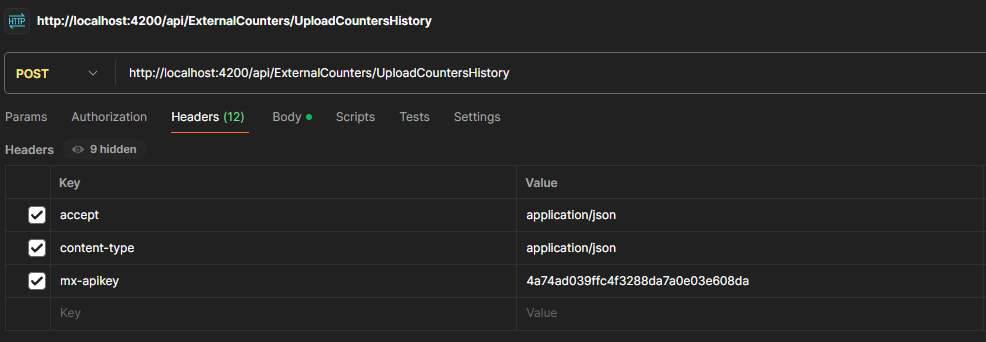
In the Headers tab the API key can be changed:

[![image.png](https://docs.mxsuite.nl/uploads/images/gallery/2025-01/scaled-1680-/cejimage.png)](https://docs.mxsuite.nl/uploads/images/gallery/2025-01/cejimage.png)
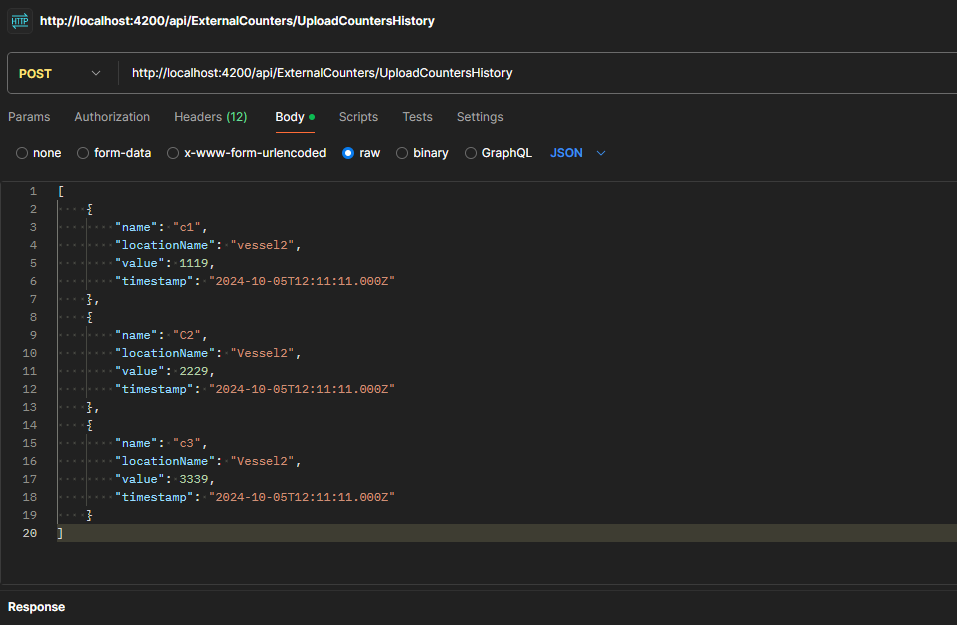
In the Body tab, the payload value can be changed.

[![image.png](https://docs.mxsuite.nl/uploads/images/gallery/2025-01/scaled-1680-/CR6image.png)](https://docs.mxsuite.nl/uploads/images/gallery/2025-01/CR6image.png)
##### Console

Define a payload variable:

```json
let payload = [
    {
        "name": "c1",
	"locationName": "vessel2",
        "value": 1119,
        "timestamp": new Date(2024,09,05,15,11,11)
    },
    {
        "name": "C2",
	"locationName": "Vessel2",
        "value": 2229,
        "timestamp": new Date(2024,09,05,15,11,11)
    },
    {
        "name": "c3",
	"locationName": "Vessel2",
        "value": 3339,
        "timestamp": new Date(2024,09,05,15,11,11)
    }
];
```

Request:

```
fetch("http://localhost:4200/api/ExternalCounters/UploadCountersHistory", {
  "headers": {
    "accept": "application/json",
    "content-type": "application/json",
    "mx-apikey": "4a74ad039ffc4f3288da7a0e03e608da",
  },
  "body": JSON.stringify(payload),
  "method": "POST"
}).then(response => response.json())
  .then(data => console.log(data))
  .catch(error => console.error('Error:', error));

```

<p class="callout info">Don't forget to change the mx-apikey header value</p>

# Update counters via API

### Overview

The Counters API provides endpoints for managing running hours (counters) within the MXSuite system. This API allows you to upload counter history records for one or more counters at a location, with proper authorization controls.

### Base URL

- api/external/Counters/

#### 1. Upload Counters History

##### Overview

The Upload Counters History endpoint allows authorized users to upload a batch of running hours (counter) history records for one or more counters at a specific location. This is typically used to record the latest readings for equipment counters.

##### Endpoint

**POST** /api/external/Counters/UploadCountersHistory

##### Authentication

All endpoints require authentication and appropriate user rights.  
This endpoint requires the UpdateRunningHours right and the location must not be read-only.  
Authorization is enforced via the MXApiPolicyAuthorize attribute.

##### Request

```json
{
  name: string,
  locationName: string,
  value: number,
  timeStamp: Date
}
```

```json
[
  {
    "Name": "Main Engine",
    "LocationName": "Neptune",
    "Value": 12345,
    "TimeStamp": "2025-06-23T14:00:00Z"
  },
  {
    "Name": "Generator 1",
    "LocationName": "Neptune",
    "Value": 6789,
    "TimeStamp": "2025-06-23T14:00:00Z"
  }
]

```

##### Error Responses

• 400 Bad Request: Invalid input data (e.g., missing required fields, invalid values).  
• 401 Unauthorized: User is not authenticated.  
• 403 Forbidden: User does not have the required rights or location is read-only.  
• 500 Internal Server Error: An unexpected error occurred.

<p class="callout warning">If there is no location with that name, the entry is ignored.  
If there is no counter with that name for that location, the entry is ignored.  
If there is already an entry added for that counter in that location with the same value and timestamp, the entry is ignored.</p>

# API for Assets Tasks

<section class="markdown-section" data-markdown-raw="

## Overview" data-section-index="2" id="bkmrk-overview"><section class="markdown-section" data-markdown-raw="

## Overview" data-section-index="2" id="bkmrk-overview-1">### Overview

The Assets APIs provides endpoints for managing assets categories, assets groups, assets tasks and sign off tasks within the MXSuite system. This API allows you to retrieve assets categories, assets groups and task sign offs, to create, update, delete and retrive assets tasks with proper authorization controls.

### Base URL


- api/external/AssetsCategories/
- api/external/AssetsGroups/
- api/external/AssetsTasks/
- api/external/AssetsTaskSignOffs/

#### 1. Assets Categories

##### Overview

</section><section class="markdown-section" data-markdown-raw="
The Maintenance Task API provides endpoints for managing maintenance tasks within the MXSuite system. This API allows you to create, update, delete, and retrieve maintenance tasks with proper authorization controls." data-section-index="3" id="bkmrk-the-maintenance-task">The Assets Category API provides endpoints for managing assets categories within the MXSuite system. This API allows you to retrieve assets categories with proper authorization controls.</section>
##### Base URL

api/external/AssetsCategories/

<section class="markdown-section" data-markdown-raw="

## Authentication" data-section-index="5" id="bkmrk-authentication">##### Authentication

</section><section class="markdown-section" data-markdown-raw="
All endpoints require authentication and appropriate user rights. The API uses token-based authentication through the `MXApiPolicyAuthorize` attribute." data-section-index="6" id="bkmrk-all-endpoints-requir">All endpoints require authentication and appropriate user rights. The API uses token-based authentication through the <span class="markdown-inline-code leading-[1.4]">MXApiPolicyAuthorize</span> attribute.</section>
### Endpoints

#### 1. Get categories

Endpoint: <section class="markdown-section" data-markdown-raw="

## Base URL
```
api/ExternalMaintenanceTask/
```" data-section-index="4">GET /api/external/AssetsCategories/Get?locationName=Neptune

##### Request:

Query parameter:  
• locationName=Neptune

##### Validations:  


- **LocationName**: Required, max length 128.

##### Response:

```json
[
  {
    "id": "b1a2c3d4-e5f6-7890-abcd-1234567890ab",
    "uniqueId": "CAT-001",
    "name": "Engine Room",
    "parentId": "c2b3a4d5-e6f7-8901-bcda-2345678901bc",
    "displayIndex": 1
  }
]

```

</section></section><section class="markdown-section" data-markdown-raw="

## Overview" data-section-index="2" id="bkmrk-2.-assets-groups-ove">### 2. Assets Groups

#### Overview

</section><section class="markdown-section" data-markdown-raw="
The Maintenance Task API provides endpoints for managing maintenance tasks within the MXSuite system. This API allows you to create, update, delete, and retrieve maintenance tasks with proper authorization controls." data-section-index="3" id="bkmrk-the-assets-groupsapi">The Assets GroupsAPI provides endpoints for managing assets groups within the MXSuite system. This API allows you to retrieve assets groups with proper authorization controls.</section><section class="markdown-section" data-markdown-raw="

## Base URL
```
api/ExternalMaintenanceTask/
```" data-section-index="4" id="bkmrk-base-url-api%2Fexterna-1">#### Base URL

api/external/AssetsGroups/

<section class="markdown-section" data-markdown-raw="

## Authentication" data-section-index="5" id="bkmrk-authentication-2">#### Authentication

</section><section class="markdown-section" data-markdown-raw="
All endpoints require authentication and appropriate user rights. The API uses token-based authentication through the `MXApiPolicyAuthorize` attribute." data-section-index="6" id="bkmrk-all-endpoints-requir-1">All endpoints require authentication and appropriate user rights. The API uses token-based authentication through the <span class="markdown-inline-code leading-[1.4]">MXApiPolicyAuthorize</span> attribute.</section><section class="markdown-section" data-markdown-raw="

## Endpoints" data-section-index="7" id="bkmrk-endpoints-1.-get-gro">### Endpoints

#### 1. Get groups

##### Endpoint:

GET /api/external/AssetsGroups/Get?categoryId=b1a2c3d4-e5f6-7890-abcd-1234567890ab

##### Request:

Query parameter:  
• categoryId=b1a2c3d4-e5f6-7890-abcd-1234567890ab

##### Response:

```json
[
  {
    "id": "d3e4f5a6-b7c8-9012-cdab-3456789012cd",
    "type": 1,
    "uniqueId": "GRP-001",
    "name": "Auxiliary Systems",
    "displayIndex":1
  }
]

```

##### Validations:  


- **CategoryId**: Required, valid GUID

</section></section><section class="markdown-section" data-markdown-raw="

## Overview" data-section-index="2" id="bkmrk-overview-5">### 3. Assets Tasks

#### Overview

</section><section class="markdown-section" data-markdown-raw="
The Maintenance Task API provides endpoints for managing maintenance tasks within the MXSuite system. This API allows you to create, update, delete, and retrieve maintenance tasks with proper authorization controls." data-section-index="3" id="bkmrk-the-assets-task-api-">The Assets Task API provides endpoints for managing maintenance tasks within the MXSuite system. This API allows you to create, update, delete, and retrieve maintenance tasks with proper authorization controls.</section>```json
{
  "GroupId":"3C160DF1-3A5C-406F-BAC6-00A4AB8C44A9",
  "GroupType":1,
  "UniqueId": "Task-001",
  "TaskName": "Oil Change - Updated",
  "Interval": 45,
  "IntervalType": 1,
  "DueDate": "2025-06-01T00:00:00Z",
  "IsCounterBased": false,
  "IsRemarkMandatory": true,
  "IsProject": false,
  "IsRecurrent": true,
  "IsFixedInterval": true,
  "IsAtServiceRequest": false,
  "IsDefect": false,
  "TaskDescription": "Updated description for oil change.",
  "MaxInterval": 90,
  "MaxIntervalType": 2,
  "DueCounters": 150,
  "Downtime": 3.0,
  "WarningInterval": 10,
  "WarningIntervalType": 1,
  "CounterName": "Main Engine",
  "DefaultEstimatedBudget": {
    "Amount": 600.0,
    "Currency": "USD" 
  },
  "Ranks": ["Rank1", "Rank2"],
  "ApproverRanks": ["Approver1"],
  "RequiresApproval": true
}

```

<section class="markdown-section" data-markdown-raw="

## Base URL
```
api/ExternalMaintenanceTask/
```" data-section-index="4" id="bkmrk-base-url-api%2Fexterna-2">#### Base URL

api/external/AssetsTasks/

<section class="markdown-section" data-markdown-raw="

## Authentication" data-section-index="5" id="bkmrk-authentication-4">#### Authentication

</section><section class="markdown-section" data-markdown-raw="
All endpoints require authentication and appropriate user rights. The API uses token-based authentication through the `MXApiPolicyAuthorize` attribute." data-section-index="6" id="bkmrk-all-endpoints-requir-2">All endpoints require authentication and appropriate user rights. The API uses token-based authentication through the <span class="markdown-inline-code leading-[1.4]">MXApiPolicyAuthorize</span> attribute.</section><section class="markdown-section" data-markdown-raw="

## Endpoints" data-section-index="7" id="bkmrk-endpoints-3">### Endpoints

</section><section class="markdown-section" data-markdown-raw="

### 1. Create Maintenance Task" data-section-index="8" id="bkmrk-1.-create-maintenanc">#### 1. Create Maintenance Task

</section><section class="markdown-section" data-markdown-raw="
Creates a new maintenance task in the system." data-section-index="9" id="bkmrk-creates-a-new-mainte">Creates a new maintenance task in the system.</section><section class="markdown-section" data-markdown-raw="
Creates a new maintenance task in the system." data-section-index="9"></section>##### <span class="markdown-bold-text">Endpoint</span>

<section class="markdown-section" data-markdown-raw="
**Endpoint:** `POST api/ExternalMaintenanceTask/Create`" data-section-index="11"><span class="markdown-inline-code leading-[1.4]">POST api/external/AssetsTasks/Create</span></section>##### <span class="markdown-bold-text">Authorization Required:</span>

<section class="markdown-section" data-markdown-raw="
**Authorization Required:**
- User must have `AddMaintenanceTask` rights
- Location must not be read-only" data-section-index="13">- User must have <span class="markdown-inline-code leading-[1.4]">AddMaintenanceTask</span> rights

##### Validations  


- **GroupId:** identifies the group together with **GroupType.** Both are ***required***
- **UniqueId**: Max length 50. Not required, but should be unique if provided.
- **TaskName**: ***Required***, max length 128, must be unique.
- **Interval**: Must be greater than 0, within limits based on **IntervalType**.
- **IntervalType, MaxIntervalType** or **WarningIntervalType**: should contain one of these values: 
    - - 1 = days
        - 2 = weeks
        - 3 = months
- **DueDate**: Must be between **01/01/1900** and **01/01/2100**.
- **TaskDescription**: ***Required*** depending on how it is set in Administration &gt; Assets &gt; Tasks &gt; Settings  
    [![image.png](https://docs.mxsuite.nl/uploads/images/gallery/2025-07/scaled-1680-/NP5image.png)](https://docs.mxsuite.nl/uploads/images/gallery/2025-07/NP5image.png)
- **Ranks**: ***Required*** for tasks requiring approval.
- **RequiresApproval**: Must be false for Silver licenses.
- **ApproverRanks: *Required*** only if **RequiresApproval** is set to **true.**
- **Currency**: when provided, it should contain the currency name as seen in Administration &gt; Currencies [![image.png](https://docs.mxsuite.nl/uploads/images/gallery/2025-07/scaled-1680-/dReimage.png)](https://docs.mxsuite.nl/uploads/images/gallery/2025-07/dReimage.png)
- When a **rank** is provided (e.g.: **Ranks** or **ApproverRanks**), the name from Administration &gt; Ranks should be used: [![image.png](https://docs.mxsuite.nl/uploads/images/gallery/2025-07/scaled-1680-/FFbimage.png)](https://docs.mxsuite.nl/uploads/images/gallery/2025-07/FFbimage.png)
- **CounterName**: required when **IsCounterBased** is set to true. The values provided should be the ones defined in Symmary &gt; Counters
- **WarningInterval + WarningIntervalType**: required when **IsCounterBased** is set to true.

##### Errors

- 409 Conflict
- 404 Not Found: Task not found.
- 412 Precondition failed: Exceeding limits for intervals
- 403 Forbidden
- 400 Bad Request: Validation errors and required fields

##### Response

```json
{
  "TaskId": "1463aea5-9062-45bf-8b9c-24cc5615d467"
}

```

##### Fields details:

- General task details  
    [![image.png](https://docs.mxsuite.nl/uploads/images/gallery/2025-07/scaled-1680-/image.png)](https://docs.mxsuite.nl/uploads/images/gallery/2025-07/image.png)

- Counter based tasks: [![image.png](https://docs.mxsuite.nl/uploads/images/gallery/2025-07/scaled-1680-/MOPimage.png)](https://docs.mxsuite.nl/uploads/images/gallery/2025-07/MOPimage.png)

- Approver ranks: [![image.png](https://docs.mxsuite.nl/uploads/images/gallery/2025-07/scaled-1680-/ZJximage.png)](https://docs.mxsuite.nl/uploads/images/gallery/2025-07/ZJximage.png)

</section><section class="markdown-section" data-markdown-raw="
**Request Body:**" data-section-index="15" id="bkmrk-2.-update-maintenanc"><section class="markdown-section" data-markdown-raw="

### 2. Update Maintenance Task" data-section-index="19" id="bkmrk-2.-update-maintenanc-1">#### 2. Update Maintenance Task

</section><section class="markdown-section" data-markdown-raw="
Updates an existing maintenance task." data-section-index="20" id="bkmrk-updates-an-existing-">Updates an existing maintenance task.</section>##### <span class="markdown-bold-text">Endpoint</span>

<section class="markdown-section" data-markdown-raw="
**Endpoint:** `PUT api/ExternalMaintenanceTask/Update`" data-section-index="22"><span class="markdown-inline-code leading-[1.4]">PUT api/external/AssetsTasks/Update</span></section>##### <span class="markdown-bold-text">Authorization Required</span>

<section class="markdown-section" data-markdown-raw="
**Authorization Required:**
- User must have `EditMaintenanceTask` rights
- Location must not be read-only" data-section-index="24">- User must have <span class="markdown-inline-code leading-[1.4]">EditMaintenanceTask</span> rights

```json
{
  "UniqueId": "Task-001",
  "TaskName": "Oil Change - Updated",
  "TaskId": "1463aea5-9062-45bf-8b9c-24cc5615d467",
  "GroupId":"3C160DF1-3A5C-406F-BAC6-00A4AB8C44A9",
  "GroupType":1,
  "Interval": 45,
  "IntervalType": 1,
  "DueDate": "2025-06-01T00:00:00Z",
  "IsCounterBased": false,
  "IsRemarkMandatory": true,
  "IsProject": false,
  "IsRecurrent": true,
  "IsFixedInterval": true,
  "IsAtServiceRequest": false,
  "IsDefect": false,
  "TaskDescription": "Updated description for oil change.",
  "MaxInterval": 90,
  "MaxIntervalType": 2,
  "DueCounters": 150,
  "Downtime": 3.0,
  "WarningInterval": 10,
  "WarningIntervalType": 1,
  "CounterName": "Main Engine",
  "DefaultEstimatedBudget": {
    "Amount": 600.0,
    "Currency":  "EURO"
  },
  "Ranks": ["Rank1", "Rank2"],
  "ApproverRanks": ["Approver1"],
  "RequiresApproval": true
}
```

##### Validations

Same as the **Create** action.

##### Errors

- 409 Conflict
- 404 Not Found: Task not found.
- 412 Precondition failed: Exceeding limits for intervals
- 403 Forbidden
- 400 Bad Request: Validation errors and required fields

</section></section><section class="markdown-section" data-markdown-raw="
```json
{
    "locationName": "string",
    "categoryName": "string",
    "groupName": "string",
    "taskName": "string",
    "taskDescription": "string",
    "uniqueId": "string",
    "interval": number,
    "intervalType": "string",
    "warningInterval": number,
    "warningIntervalType": "string",
    "maxInterval": number,
    "maxIntervalType": "string",
    "projectTypeIds": ["string"],
    "defaultContractor": "string",
    "estimatedBudget": number,
    "currency": "string",
    "taskRanks": ["string"],
    "projectRanks": ["string"],
    "defectRanks": ["string"],
    "approverRanks": ["string"],
    "runningHours": number,
    "costCode": "string",
    "dueDate": "string"
}
```" data-section-index="16" id="bkmrk-3.-delete-maintenanc"><div class="markdown-code-outer-container"><div class="composer-message-codeblock"><div forcegap="2" forcererender="1"><div><section class="markdown-section" data-markdown-raw="

### 3. Delete Maintenance Task" data-section-index="30" id="bkmrk-3.-delete-maintenanc-1">#### 3. Delete Maintenance Task

</section><section class="markdown-section" data-markdown-raw="
Deletes a maintenance task from the system." data-section-index="31" id="bkmrk-deletes-a-maintenanc">Description: Deletes a maintenance task.</section><section class="markdown-section" data-markdown-raw="
Deletes a maintenance task from the system." data-section-index="31">- **HTTP Method**: DELETE
- There can be to types of request bodies, please see examples below

</section><section class="markdown-section" data-markdown-raw="
**Authorization Required:**
- User must have `DeleteMaintenanceTask` rights
- Location must not be read-only" data-section-index="35" id="bkmrk-authorization-requir-2">##### <span class="markdown-bold-text">Authorization Required</span>

</section><section class="markdown-section" data-markdown-raw="
**Authorization Required:**
- User must have `DeleteMaintenanceTask` rights
- Location must not be read-only" data-section-index="35">- User must have <span class="markdown-inline-code leading-[1.4]">Delete Maintenance Task</span> rights

**Request body for URL /api/external/AssetsTasks/delete?taskId={taskId}**

</section></div></div></div></div><div class="markdown-code-outer-container"><div class="composer-message-codeblock"><div forcegap="2" forcererender="1"><div><div class="anysphere-icon-button bg-[transparent] border-none text-foreground flex w-3 items-center justify-center undefined">Response</div><div class="anysphere-icon-button bg-[transparent] border-none text-foreground flex w-3 items-center justify-center undefined">• Status Code: 204 No Content  
• Body: Empty response on success.  
</div><div class="anysphere-icon-button bg-[transparent] border-none text-foreground flex w-3 items-center justify-center undefined">  
</div></div></div></div></div>##### Validations

**• taskId:** Required, must be a valid GUID.

##### Errors

• 404 Not Found: Task not found.  
• 500 Internal Server Error: Unexpected errors.

<section class="markdown-section" data-markdown-raw="

### 4. Get Maintenance Task Details" data-section-index="41" id="bkmrk-4.-get-maintenance-t">#### 4. Get

##### Endpoint

/api/external/AssetsTasks/Get**?taskId={taskId}**

##### Validations

• taskId: Required, must be a valid GUID.

#### 5. Get Multiple Tasks 

##### Endpoint

/api/external/AssetsTasks/GetTasks

##### Request JSON

```json
[
    "1463aea5-9062-45bf-8b9c-24cc5615d467",
    "7b95cb8b-0cb8-4cdf-ad3e-3285a162cbea"
]

```

##### Validations

• taskIds: Required, must be a list of valid GUIDs.

#### 6. Get Tasks Ids

 Retrieves the IDs of maintenance task/s.

</section><section class="markdown-section" data-markdown-raw="
**Endpoint:** `GET api/ExternalMaintenanceTask/Get`" data-section-index="44" id="bkmrk-endpoint%3A%C2%A0get-api%2Fex">• HTTP Method: GET  
• URL: /api/external/AssetsTasks/GetTasksIds</section><section class="markdown-section" data-markdown-raw="
**Endpoint:** `GET api/ExternalMaintenanceTask/Get`" data-section-index="44"></section>##### <span class="markdown-bold-text">Authorization Required</span>

<section class="markdown-section" data-markdown-raw="
**Authorization Required:**
- Location must not be read-only" data-section-index="46">- Location must not be read-only

</section><section class="markdown-section" data-markdown-raw="
**Query Parameters:**" data-section-index="48" id="bkmrk-request-body%3A-%7B-%C2%A0-%C2%A0-"><div><section class="markdown-section" data-markdown-raw="
**Authorization Required:**
- User must have `DeleteMaintenanceTask` rights
- Location must not be read-only" data-section-index="35" id="bkmrk-request-body%3A">##### Request body

</section></div>```json
{
  "GroupId": "d3e4f5a6-b7c8-9012-cdab-3456789012cd",
  "GroupType": 1
}

```

</section><section class="markdown-section" data-markdown-raw="
```
locationName: string
categoryName: string
groupName: string (optional)
taskName: string (optional)
```" data-section-index="49" id="bkmrk-response%E2%80%A2-%C2%A0-%C2%A0status-"><div class="markdown-code-outer-container"><div><div class="composer-message-codeblock"><div><div><div forcegap="2" forcererender="1"><div>  
</div><div>Response</div><div>• Status Code: 200 OK</div><div>  
</div></div><div>  
</div></div></div></div></div></div>```json
[
  "e4f5a6b7-c8d9-0123-dabc-4567890123de",
  "f5a6b7c8-d9e0-1234-abcd-5678901234ef"
]
```

<div class="markdown-code-outer-container"><div><div class="composer-message-codeblock"><div><div><div>Validations</div><div>• **GroupId**: Must be GUID• **GroupType**: Must be a positive number.</div><div forcegap="2" forcererender="1"><div>  
</div><div>  
</div><div>Errors</div><div>  
• 404 Not Found: Task not found.  
• 500 Internal Server Error: Unexpected errors.</div></div></div></div></div></div></div><section class="markdown-section" data-markdown-raw="

## Overview" data-section-index="2" id="bkmrk-overview-7">### 4. Assets Task Sign Offs

#### Overview

</section><section class="markdown-section" data-markdown-raw="
The Maintenance Task API provides endpoints for managing maintenance tasks within the MXSuite system. This API allows you to create, update, delete, and retrieve maintenance tasks with proper authorization controls." data-section-index="3" id="bkmrk-the-assets-task-sign">The Assets Task Sign Offs API provides endpoints for managing task sign offs within the MXSuite system. This API allows you to retrieve task sign offs with proper authorization controls.</section><section class="markdown-section" data-markdown-raw="

## Base URL
```
api/ExternalMaintenanceTask/
```" data-section-index="4" id="bkmrk-base-url-api%2Fexterna-3">#### Base URL

api/external/AssetsTaskSignOffs/

<section class="markdown-section" data-markdown-raw="

## Authentication" data-section-index="5" id="bkmrk-authentication-6">#### Authentication

</section><section class="markdown-section" data-markdown-raw="
All endpoints require authentication and appropriate user rights. The API uses token-based authentication through the `MXApiPolicyAuthorize` attribute." data-section-index="6" id="bkmrk-all-endpoints-requir-3">All endpoints require authentication and appropriate user rights. The API uses token-based authentication through the <span class="markdown-inline-code leading-[1.4]">MXApiPolicyAuthorize</span> attribute.</section><section class="markdown-section" data-markdown-raw="

## Endpoints" data-section-index="7" id="bkmrk-endpoints-1.-get-sig">### Endpoints

#### 1. Get Sign-Offs

</section></section><div class="markdown-code-outer-container"><div>  
</div><div>Endpoint</div><div>  
</div><div>/api/external/AssetsTaskSignOffs/Get</div><div>  
</div><div>**Request JSON:**</div><div>  
</div></div>```json
{
  "TaskId": "7b95cb8b-0cb8-4cdf-ad3e-3285a162cbea",
  "NumberOfSignOffs": 5
}

```

##### Validations

• TaskId: Required, must be a valid GUID.  
• NumberOfSignOffs: Optional, must be a valid number.

<div class="markdown-code-outer-container">  
</div><div class="markdown-code-outer-container" id="bkmrk--1"><div>Authorization</div><div>  
</div><div>• Ensure the user has the required rights (UserRights) for each endpoint (Add task, edit task, delete task )  
• The LocationIsNotReadOnly flag must be true for all operations.  
</div></div></section><div><section class="markdown-section" data-markdown-raw="

## Error Responses" data-section-index="51" id="bkmrk-error-responses">### Error Responses

All error responses follow this structure:

```json
{
  "Errors": [
    {
      "message": "string",
      "errorCode": number,
      "isBusinessException": false,
      "businessExceptionData": null,
      "failureServerReason": null
    }
  ]
}
```

```json
{
    "errors": [
        {
            "message": "Category name is required",
            "errorCode": 9,
            "isBusinessException": false,
            "businessExceptionData": null,
            "failureServerReason": null
        }
    ]
}
```

</section><section class="markdown-section" data-markdown-raw="
The API may return the following error responses:" data-section-index="53" id="bkmrk-the-api-may-return-t">The API may return the following error responses:</section><section class="markdown-section" data-markdown-raw="

1. **400 Bad Request**
   - When request validation fails
   - When required fields are missing
   - When field values are invalid" data-section-index="54" id="bkmrk-400-bad-request-when">1. <span class="markdown-bold-text">400 Bad Request</span>

- When request validation fails

- When required fields are missing

- When field values are invalid

</section><section class="markdown-section" data-markdown-raw="

2. **401 Unauthorized**
   - When authentication token is missing or invalid
   - When user doesn't have required rights" data-section-index="55" id="bkmrk-401-unauthorized-whe">1. <span class="markdown-bold-text">401 Unauthorized</span>

- When authentication token is missing or invalid

- When user doesn't have required rights

</section><section class="markdown-section" data-markdown-raw="

3. **403 Forbidden**
   - When location is read-only
   - When user doesn't have sufficient permissions" data-section-index="56" id="bkmrk-403-forbidden-when-l">1. <span class="markdown-bold-text">403 Forbidden</span>

- When location is read-only

- When user doesn't have sufficient permissions

</section><section class="markdown-section" data-markdown-raw="

4. **404 Not Found**
   - When requested task doesn't exist
   - When location or category doesn't exist" data-section-index="57" id="bkmrk-404-not-found-when-r">1. <span class="markdown-bold-text">404 Not Found</span>

- When requested task doesn't exist

- When location or category doesn't exist

</section><section class="markdown-section" data-markdown-raw="

5. **409 Conflict**
   - When trying to create a duplicate task
   - When task name already exists in the specified location/category/group" data-section-index="58" id="bkmrk-409-conflict-when-tr">1. <span class="markdown-bold-text">409 Conflict</span>

- When trying to create a duplicate task

- When task name already exists in the specified location/category/group

<section class="markdown-section" data-markdown-raw="

## Validation Rules" data-section-index="59" id="bkmrk-validation-rules">### Validation Rules and status codes

</section></section><div><div>0: **UnknownError** - A generic or unspecified error. Used as a fallback when the specific cause is not known. </div><div>Status: **400 Bad Request**</div>  
<div>1–3: **Duplicate/Uniqueness Errors**</div><div>• 1: **TaskNameDuplicate**: The task name already exists in the system.</div><div>• 2: **UniqueIdDuplicate**: The unique identifier for a task is already in use.</div><div>• 3: **TaskNameDuplicateInGroup**: The task name is duplicated within a specific group.</div>  
<div>Status: **409 Conflict**</div>  
<div>4–10: **Not Found Errors**</div><div>• 4: **LocationNotFound**: The specified location does not exist.</div><div>• 5: **CategoryNotFound**: The specified category does not exist.</div><div>• 6: **GroupNotFound**: The specified group does not exist.</div><div>• 7: **TaskNotFound**: The specified task does not exist.</div><div>• 8: **RankNotFound**: The specified rank does not exist.</div><div>• 9: **ApproverRankNotFound**: The specified approver rank does not exist.</div><div>• 10: **CurrencyNotFound**: The specified currency does not exist.</div>  
<div>Status: **404 Not Found**</div>  
<div>11–31: **Required Field Errors**</div><div>• 11: **LocationRequired**: Location is required but missing.</div><div>• 12: **CategoryRequired**: Category is required but missing.</div><div>• 13: **GroupRequired**: Group is required but missing.</div><div>• 14: **TaskRequired**: Task is required but missing.</div><div>• 15: **TaskNameRequired**: Task name is required but missing.</div><div>• 16: **TaskDescriptionRequired**: Task description is required but missing.</div><div>• 17: **UniqueIdRequired**: Unique ID is required but missing.</div><div>• 18: **IntervalRequired**: Interval value is required but missing.</div><div>• 19: **IntervalTypeRequired**: Interval type is required but missing.</div><div>• 20: **WarningIntervalRequired**: Warning interval is required but missing.</div><div>• 21: **WarningIntervalTypeRequired**: Warning interval type is required but missing.</div><div>• 22: **MaxIntervalTypeRequired**: Max interval type is required but missing.</div><div>• 23: **ProjectRanksRequired**: Project ranks are required but missing.</div><div>• 24: **DefectRanksRequired**: Defect ranks are required but missing.</div><div>• 25: **ApproverRanksRequired**: Approver ranks are required but missing.</div><div>• 26: **RunningHoursRequired**: Running hours are required but missing.</div><div>• 27: **DueDateRequired**: Due date is required but missing.</div><div>• 28: **TaskIdRequired**: Task ID is required but missing.</div><div>• 29: **RankRequired**: Rank is required but missing.</div><div>• 30: **RanksRequired**: Ranks are required but missing.</div><div>• 31: **TaskListEmptyOrNull**: The list of tasks is empty or null.</div><div>Status: **400 Bad Request**</div>  
<div>32–34: **Length Validation Errors**</div><div>• 32: **TaskNameTooLong**: Task name exceeds the maximum allowed length.</div><div>• 33: **LocationNameTooLong**: Location name exceeds the maximum allowed length.</div><div>• 34: **UniqueIdTooLong**: Unique ID exceeds the maximum allowed length.</div><div>Status: **400 Bad Request**</div>  
<div>35–44: **Numeric/Value Validation Errors**</div><div>• 35: **GroupTypeGreaterThanZero**: Group type must be greater than zero.</div><div>• 36: **IntervalGreaterThanZero**: Interval must be greater than zero.</div><div>• 37: **WarningIntervalGreaterThanZero**: Warning interval must be greater than zero.</div><div>• 38: **MaxIntervalGreaterThanZero**: Max interval must be greater than zero.</div><div>• 39: **IntervalExceedsLimit**: Interval exceeds the allowed limit.</div><div>• 40: **WarningIntervalExceedsLimit**: Warning interval exceeds the allowed limit.</div><div>• 41: **MaxIntervalExceedsLimit**: Max interval exceeds the allowed limit.</div><div>• 42: **EstimatedBudgetAmountGreaterThanZero**: Estimated budget must be greater than zero.</div><div>• 43: **DueRunningHoursPositiveError**: Due running hours must be positive.</div><div>• 44: **DowntimeGreaterThanZero**: Downtime must be greater than zero. Status:</div><div>• 39–41: **412 Precondition Failed**</div><div>• Others: **400 Bad Request**</div>  
<div>45–51: **Business Rule Validation Errors**</div><div>• 45: **ProjectCannotBeCounterBased**: Projects cannot be based on counters.</div><div>• 46: **TaskCompletionApprovalNotAllowed**: Task completion approval is not allowed.</div><div>• 47: **DefectRequiresOneTimeTask**: Defect tasks must be one-time tasks.</div><div>• 48: **ApproverRankNotAllowed**: Approver rank is not allowed.</div><div>• 49: **DowntimeNotAllowed**: Downtime is not allowed.</div><div>• 50: **AttachmentNotAllowed**: Attachments are not allowed.</div><div>• 51: **PriorityNotAllowed**: Priority is not allowed. Status:</div><div>• 45, 47: **412 Precondition Failed**</div><div>• 46, 48–51: **403 Forbidden**</div>  
<div>54–56: **Invalid/Out-of-Range Errors**</div><div>• 54: **WarningIntervalTypeInvalid**: Warning interval type is invalid.</div><div>• 55: **IntervalTypeInvalid**: Interval type is invalid.</div><div>• 56: **MaxIntervalTypeInvalid**: Max interval type is invalid.</div><div>• 57: **InvalidRanks**: Ranks are invalid</div>  
Status: **400 Bad Request**</div><div>  
<div>• 58: **UserIsNotAllowedOnLocation**: User is not allowed on the specified location (**400 Bad Request**)</div></div>  
</div></section></section>